
Skip to content

LITEBOARD / DIGITAL SIGNAGE

One place.
All your screens.

With LiteBoard, you can display menus, offers, announcements or presentations on screens at one or more locations. Content is managed through a web platform, from your computer or phone.

From the platform to your screens. Select a slide in the platform open in the phone browser on the left. The same slide appears on the television in the centre, via the LiteBoard player on the right. LITEBOARD

01 / HOW IT WORKS

How content reaches
your screens

Each screen is connected to a LiteBoard player. Use the web platform to upload content and choose where it will be displayed.

  1. Upload your content

    Open the platform in your browser and add the images or videos you want to display.

  2. Send it to your screens

    Your content reaches the LiteBoard players connected to the network, without you having to visit each location.

  3. Your screens play the content

    The content is displayed on the TVs or monitors installed at your locations.

02 / THE MANAGEMENT PLATFORM

Screens in many places.
Control from one place.

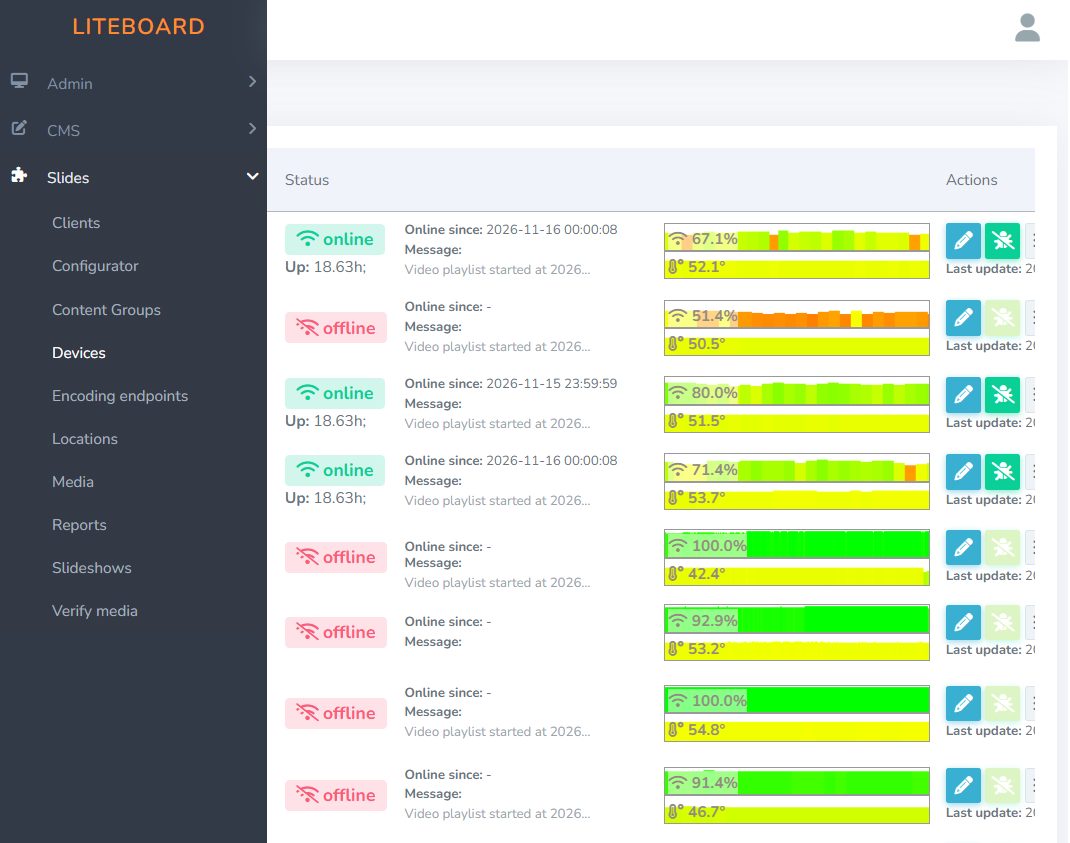
Use the web platform to manage devices, locations and the content displayed on your screens. You can check which players are online and update content without visiting each screen.

  • Device and location management
  • Visibility of online / offline status
  • Media and slideshow management

Actual interface from the application developed by Lite Microsystems.
LITEBOARD / MANAGEMENT
The LiteBoard application: device list, online or offline status, and management controls.Enlarge screenshot ↗
Device list and status in the LiteBoard platform.

03 / FEATURES AND BENEFITS

What you can do

You can change the content displayed without visiting each screen, wherever it is installed.

Images and video

Display photos, videos, offers, announcements or other informational content.

Remote management

Change content and check devices directly from your browser, without having to access each player individually.

Scheduled power on and off

You can turn screens on and off remotely or set a schedule for them to turn on and off automatically.

04 / WHERE TO USE IT

Where it can be used

LiteBoard can be used in any space where you need to display information, promotional content or announcements.

Restaurants and hotels

Menus, offers, events and information for customers or guests.

Clinics and waiting rooms

Information about services, opening hours, recommendations and educational materials.

Shops and shopping centres

Promotions, new products, campaigns and other advertising content.

Offices, conferences and lobbies

Event agendas, welcome messages and announcements for employees or visitors.

Schools and universities

Timetables, events, activities and announcements for students and teachers.

Industry and logistics

Instructions, safety messages and useful information for staff.

Content examples can be adapted to your space and audience.

05 / SETUP AND OPERATION

What installation involves

LiteBoard uses a compact player connected to a TV or monitor. The setup depends on the number of screens, locations and available connectivity.
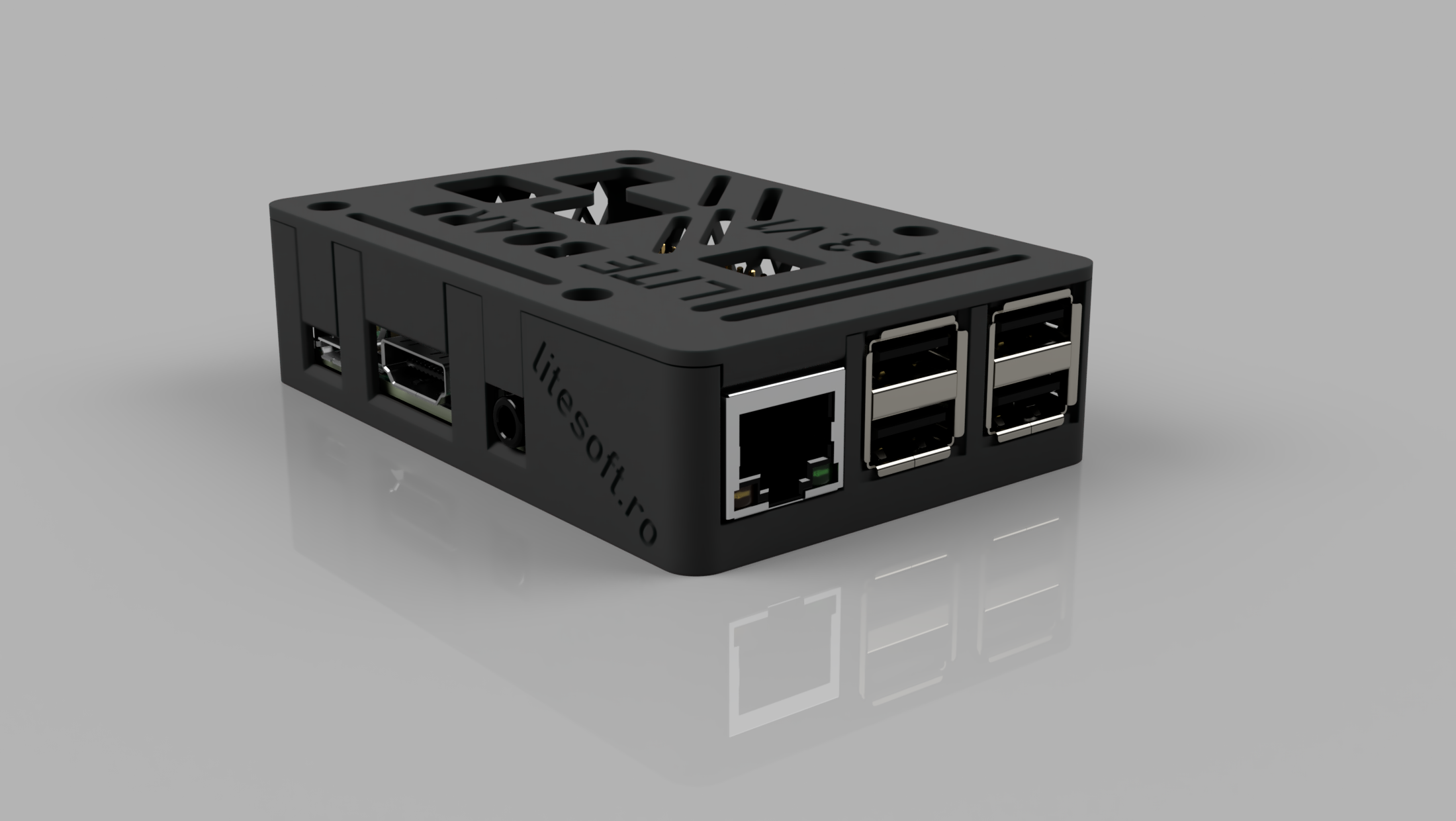
The compact LiteBoard player with HDMI, USB and network ports.
LITEBOARDRASPBERRY PI-BASED PLAYER

What Lite Microsystems provides

  • LiteBoard players and platform access, depending on the commercial option you choose.
  • Device and platform configuration.
  • Installation and support, under the terms set out in the quote.

What is needed on site

  • A TV or monitor with a compatible video input.
  • Power and a network connection.
  • The content to be displayed.

06 / FREQUENTLY ASKED QUESTIONS

Frequently asked questions

Details about screen operation and platform management.

What happens if the internet connection is lost?

The screens continue to display content that has already been uploaded. An internet connection is required for updates and remote management.

Can I set an operating schedule?

Yes. You can set the times when the TVs should be on or off, and LiteBoard automatically follows the configured schedule.

What happens after a power cut?

When power is restored, the devices restart automatically and resume displaying content.

Can multiple people access the platform?

Yes. The platform supports multiple users who can manage the screens and the content displayed.

07 / COMMERCIAL OPTIONS

How you can use LiteBoard

You can buy the devices or have them included in your subscription.

PURCHASE + SUBSCRIPTION

Buy the devices

Purchase the LiteBoard players and pay a separate subscription for use of the platform and the agreed services.

  • Upfront equipment cost
  • Lower subscription fee than the option with devices included
Discuss this option

SUBSCRIPTION WITH DEVICES INCLUDED

Devices included in the subscription

You do not need to buy the players separately. They are included in the subscription, along with access to the platform.

  • No separate equipment purchase
  • Services and terms tailored to the project
Discuss this option

Pricing, subscription length and included services depend on the number of screens and the required setup.

LET’S TALK ABOUT LITEBOARD

Let’s discuss your project

Tell us how many screens you need to manage, where they will be installed and what type of content you want to display. We will discuss the details and prepare a quote for you.

How it works

  1. Send us a few details

    An approximate number of screens and the locations where they will be installed are enough to get started.

  2. We discuss the details

    We work out what equipment is needed, what content you will display and how it will be managed.

  3. We prepare your quote

    We propose a setup and the services needed for your project.

You can also email us atsuport@litesoft.ro

Request a quote

Complete the form with the information you already have. You do not need to know all the technical details.

Fields marked with * are required.

Your project
Choose how you would like to start. You can change the option selected from the cards above.
How many screens do you want to manage in total? An estimate is fine; minimum 1.
How many sites or branches will have screens? Enter a whole number, minimum 1.
Cities and types of premises help us understand your project. Full addresses are not needed. Maximum 500 characters.
Tell us briefly about your plans and whether you already have screens. Maximum 2,000 characters.
Contact details
The name of the person we can contact. Accented letters are welcome. Maximum 150 characters.
Fill this in if you are requesting a quote for a company or organisation. Maximum 200 characters.
The address where we can reach you. Check the name and domain before submitting.
Optional, if you would prefer a call. Enter 10 to 15 digits, without spaces, + or any other characters.
Verification
Four-digit CAPTCHA code
Enter the four digits shown in the image.

Personal data notice

COOKIES

Settings and details

Necessary cookies

These support the website's operation and store your cookie choices. They are always active.

Preferences / functional

The “language” cookie remembers your chosen language (RO or EN) for one year. If you turn it off, you can still switch languages, but we will not remember your choice through this cookie for future visits.

Tracking / analytics

We do not use cookies to track your browsing or analyse traffic.

Marketing / advertising

We do not use marketing cookies or collect data for advertising.

Cookie settings page